Writen by Akshay G B
Table of Contents
How to use AI to create faceless Instagram reels without showing your face in 10 minutes
If you are secretly creative but secretly hate the camera, this article is for you.
Maybe you love storytelling, teaching, or sharing what you know. But every time you try to film a reel, you freeze.
Your brain goes blank, your smile looks forced, and you suddenly become painfully aware of your eyebrows.
Yet your feed is full of creators who seem to grow overnight. You keep asking yourself
Is there a way to grow on Instagram without showing my face
Yes. And thanks to AI, it is easier than ever.
In this long form guide, you will learn exactly how to use AI to create faceless Instagram reels without showing your face using free or affordable tools, so you can:
- Stay comfortable and private
- Still look professional and creative
- Post consistently without burning out
This guide is written from the perspective of a human style digital artist and content strategist, not a faceless robot.
You will get practical workflows, creative tips, and long tail keyword ideas you can actually rank for.
why faceless creators need AI right now
Let us be honest. Instagram today rewards two things
- Short vertical video
- Fast consistent posting
That combination alone is already hard.
Then add one more pressure
- Show your face all the time and be extremely confident on camera
For many people that third part is a deal breaker.
You may relate to at least one of these
- You dislike your voice on camera
- You are shy or introverted
- You work a day job and cannot show your face publicly
- You live in a conservative environment where content creation feels risky
- You simply prefer privacy and want your work to speak for itself
So you end up watching instead of creating. You scroll through reels where other people share tips that you also know. They are not smarter than you. They are just more willing to be seen.
This is where AI for faceless Instagram reels becomes a secret weapon.
What is a faceless Instagram reel made with AI
Before we dive into tools and workflows, let us give a clear definition.

Faceless Instagram reels made with AI are short vertical videos where
- Your real face never appears on camera
- AI helps with at least one of these parts
- 1. script writing
- 2. voice over
- 3. visuals such as images video or avatars
- 4. editing or repurposing content
Examples of faceless AI reels
A reel with aesthetic B roll clips and an AI generated voice that shares three productivity tips
A reel that shows text on screen with an AI generated background video and music
A reel where an AI avatar explains a concept while stock footage plays behind it
A carousel style reel where each slide is designed with AI images while the audio explains the story
The viewer still gets valuable content, and you stay completely anonymous.
Why faceless AI reels are a low competition growth opportunity
You might be thinking
If this is so powerful, is not everyone already doing it
Surprisingly, no. Most creators still follow the classic formula
Face to camera plus hook plus quick tip
That means faceless AI reels have several advantages
- Lower content production frictionYou can create many reels in one sitting because you do not need perfect lighting, makeup, or the right mood.Unique visual style
- Since you can generate custom AI art or stylised B roll, your feeds can look very different from big creators who mostly show their faces.Global and niche friendly
- You can create content in different languages, or use AI voice overs with a neutral accent, which makes your reels travel further.Lower competition long tail searches
- People are just starting to look for things likefree AI tools for faceless instagram reelsAI voice over for instagram reels freehow to post instagram reels without showing your face using AIThese are not as saturated as general AI terms, but still have strong future demand.
If you combine these advantages with consistent posting, you can quietly build a content machine while others remain stuck at the courage stage.
Step by step: how to use AI to create faceless Instagram reels without showing your face
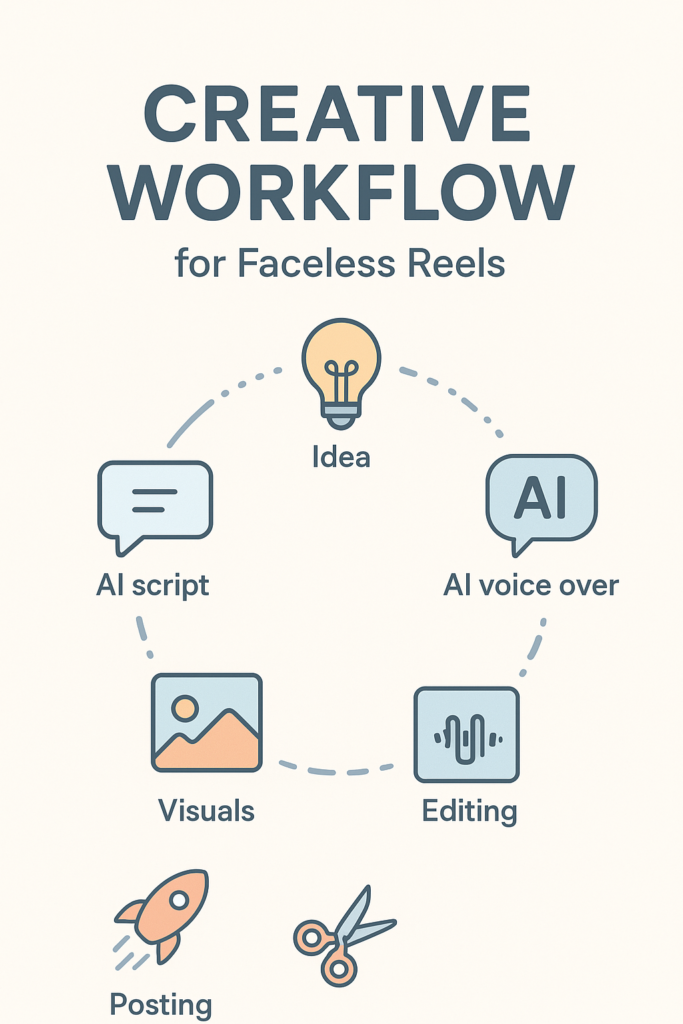
We will walk through a complete workflow from idea to published reel.
You can adapt this to almost any niche
- education
- art
- fitness
- money and business
- self growth
- tech and AI
To keep things practical, imagine this simple example niche
You teach beginners how to use AI to save time in daily life.
Step 1: Choose a precise topic and long tail angle
Instead of a generic reel like
AI can save you time
Choose a specific long tail topic such as
- how to use AI to plan your weekly meals in ten minutes
- AI prompts to organise your messy inbox
- simple AI workflow to write instagram captions for one week
These are long tail content ideas that align with search intent. Use them directly in your on screen text and caption.
You can ask an AI assistant to brainstorm topics. For example, you might request
Give me twenty faceless instagram reel ideas using AI for busy students
Then filter them for topics that sound practical and specific, not vague.
Step 2: Use an AI script writer for your Instagram reel
Your goal is to produce a short clear script that runs between eight and thirty seconds.
A simple structure for a faceless AI reel script
- Hook
- Quick context or problem
- Simple steps or tip
- Micro call to action
Example script structure for the topichow to use AI to plan your weekly meals in ten minutes
Hook Stop overthinking dinner Here is how to use AI to plan your weekly meals in ten minutes
Context If you are busy and always default to junk food, this simple AI trick will save you time and money
Steps
- Open your favourite AI chat tool
- Paste your dietary preferences, budget, and how many people you cook for
- Ask for a seven day meal plan with a single grocery list you can copy
Call to action Save this reel and use this tonight so you never ask what is for dinner again
Step 3: Generate an AI voice over for your reel
If you do not want to use your real voice, you can use an AI voice over for instagram reels.
There are three types of tools you can consider

- Cloud voice platforms that let you type text and export audio in realistic voices
- Mobile apps that combine AI voices with simple editing
- Desktop tools where you can add AI voices directly inside the editor
Look for features like
- multiple voice styles such as casual, educational, or storytelling
- clear licence terms for commercial use
- export formats that work easily with your video editor
To keep this simple
- Paste your script into the AI voice tool
- Choose a voice that matches your audience energy, for example calm and friendly for educational reels
- Adjust pacing if possible so it does not sound rushed
- Download the audio file
Now you have a faceless voice ready to narrate your content.
Step 4: Choose visuals for your faceless reel with AI
This is where your inner artist gets to play. You have several options for visuals
- B roll video clips
- AI generated images or art
- AI avatars or animated characters
- Screenshots or screen recordings
Let us match visuals to our example topic about AI meal planning.
Possible visual options
- B roll of cooking shots, groceries, cozy kitchens
- AI generated images of meal plans, neat plates, calendar pages
- Screen recording of you using an AI chat tool, but you only show the screen not your face
If you want a more artistic style, you can use an AI image generator. Ask for prompts like
Cozy kitchen table with a weekly meal planner notebook, warm natural light, realistic style
You can then turn these images into a slideshow style reel with text and voice over.
This is where free AI tools for faceless instagram reels really shine, because you can quickly fill your reel with unique visuals instead of generic stock.
Step 5: Edit the reel with a simple vertical video editor
You do not need advanced editing skills. Most beginner friendly editors support vertical video, text, and audio.
Basic editing process
- Create a new vertical 9 by 16 project
- Import your AI voice over audio
- Import your visualsArrange clips to match the rhythm of the voiceAdd text on screen for the hook and key phrases
- Add subtle background music at low volume
For faceless reels, text on screen is extremely important, because many viewers watch with sound off.
Make sure your main long tail keyword or idea appears in the first few words on screen. For example
How to use AI to plan your weekly meals in ten minutes
This helps your video feel instantly relevant when someone sees it in their feed.
Step 6: Write an SEO frhttps://logicloops.net/how-personal-ai-memory-is-quietly-becoming-the-ai/iendly caption and hashtags
Your caption is where you can place your long tail keywords for Instagram search.
For example, if the main keyword is
how to use ai to create faceless instagram reels without showing your face
you might not put that exact sentence in every reel. Instead, you use related keywords like
- faceless instagram reel ideas with ai
- save time with ai meal planning
- free ai tools for content creators
A simple caption formula
- First line with a bold promise or benefit
- Two to five short lines explaining what the reel teaches
- A gentle call to action such as
- follow for more faceless ai content
- comment meal plan if you want the prompt
Hashtags that mix niche terms and broader ones
Do not overdo generic hashtags. Mix in specific ones like
hashtag facelessreels
• hashtag aiforcreators
• hashtag aimealplanning
This helps you appear in both explore and search.
Advanced creative ideas for faceless AI reels
Once you master the basics, you can push the format further.
Idea 1: AI character hosts your series
Create a consistent AI generated character who appears in your reels as the host.
For example:
• A digital notebook spirit who gives study tips
• A friendly robot chef giving healthy hacks
• A minimalist avatar who shares business tips in clean aesthetic spaces
You can generate consistent images of this character using the same prompt style, then animate them slightly or show them in different backgrounds.
Over time, followers recognise this character like a brand mascot.
Idea 2: AI art timelapse with educational voice over
If you enjoy experimenting with AI art, you can show before and after images or timelapses of prompts evolving.
Structure
Start with a simple prompt
Show how you refine it step by step
Add AI narration explaining the changes
Complete with a final polished image
This works well with keywords like
- ai art tutorial for instagram reels
- beginner friendly ai art prompts
It blends your creative taste with educational value.
Idea 3: Text only reels with strong storytelling
Not every faceless reel must have complex visuals.
Some highly viral reels are simply text over a simple moving background with emotional or insightful narration.
You can use AI to brainstorm story ideas, then refine one into a script. Focus on
- relatable situations
- feelings your audience experiences
- a gentle lesson or insight at the end
This allows you to publish quickly without needing new footage for every post.
Common mistakes beginners make with AI faceless reels
Knowing what to avoid can save you weeks of frustration.
Mistake 1: Sounding like a robot
If you paste an unedited script from AI and use a generic voice, everything can feel cold
Fix
Add small human touches to your script
- brief personal opinions such as I know this feeling or I used to do this wrong
- rhetorical questions like Have you done this before
Choose a voice that matches human speech patterns and adjust speed
Mistake 2: Cluttered or distracting visuals
Many beginners add too many effects, transitions, or random clips. The viewer cannot tell what to focus on.
Fix
- One main visual idea per reel
- Calm backgrounds that support the message
- Text that is large, readable, and stays long enough on screen
Mistake 3: No clear keyword focus
If your caption and on screen text do not clearly express one main idea, the algorithm and viewers both get confused.
Fix
- Choose one main keyword phrase or question per reel
- Use that phrase in the hook, text, and caption in natural language
For example
main idea how to use ai to create faceless instagram reels without showing your face
Your reel might focus on one part of that, like the AI voice, but you still connect it back to the bigger concept.
Simple content plan for your first ten AI faceless reels
If you want to move from theory into action, here is a beginner friendly plan.
Remember our example nichehelping beginners save time with AI in daily life.
Ten reel ideas you can adapt
- How to use AI to write your weekly to do list in two minutes
- Use AI to answer boring emails in a polite way
- AI prompts to create a study schedule for exams
- Simple AI workflow to write instagram captions for one week
- Use AI to summarise long pdf files in one paragraph
- How to use AI to plan weekly meals in ten minutes
- Free AI tools for faceless instagram reels for beginners
- How to turn a long blog post into three short reels using AI
- AI voice over idea for shy creators
- How to batch create faceless AI reels in one hour
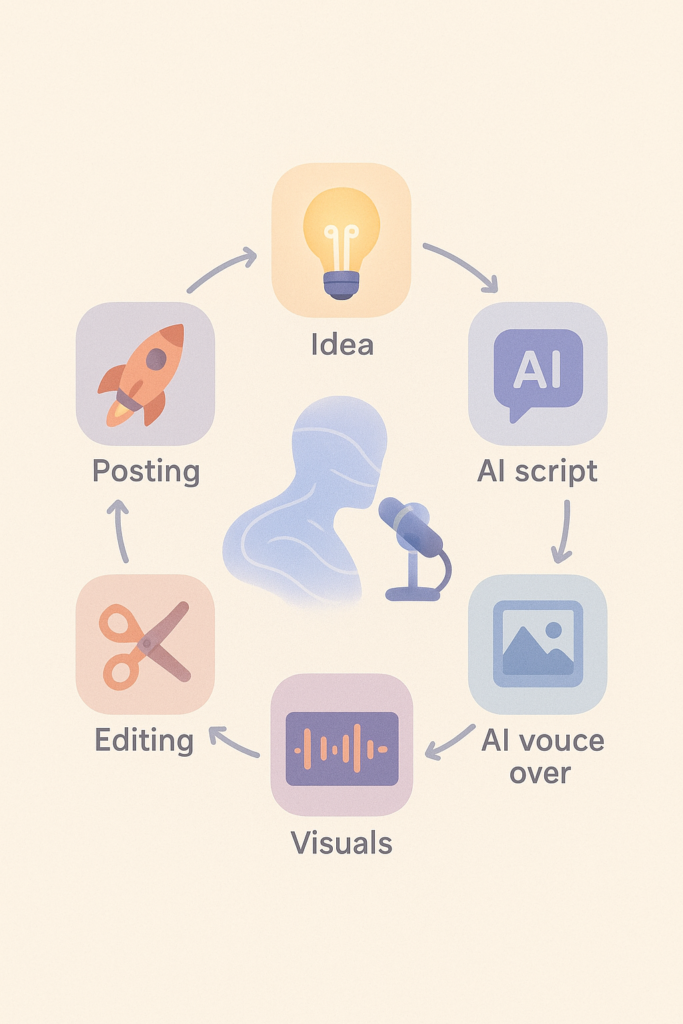
For each idea
- Write a short script with an AI script writer
- Generate or record visuals
- Add AI voice
- Edit and post
Within ten reels, you will already feel more confident and will start seeing what resonates with your audience.
Conclusion: your faceless AI creative era starts now
You do not need perfect confidence, expensive gear, or a movie star face to grow on Instagram.
What You need is
- A clear topic and keyword intent
- A simple repeatable AI workflow for scripts, voices, and visuals
- A commitment to publish consistently while learning from each reel
AI is not here to replace your creativity.
It is here to remove the awkward parts of the process that used to block you from sharing your ideas.
So your next step is simple
- Pick one long tail topic from this article
- Use an AI script writer to draft a twenty second reel
- Generate a voice over
- Combine visuals and text in a basic editor
- Post your first faceless AI reel within the next twenty four hours
You might feel nervous. That is fine. No one sees you. Only your ideas.
Let the content speak. Let AI handle the parts you dislike. And let your faceless reels quietly build the audience you deserve.
Leave a Reply